
Salesforce Release Management
Salesforce Release Management Services
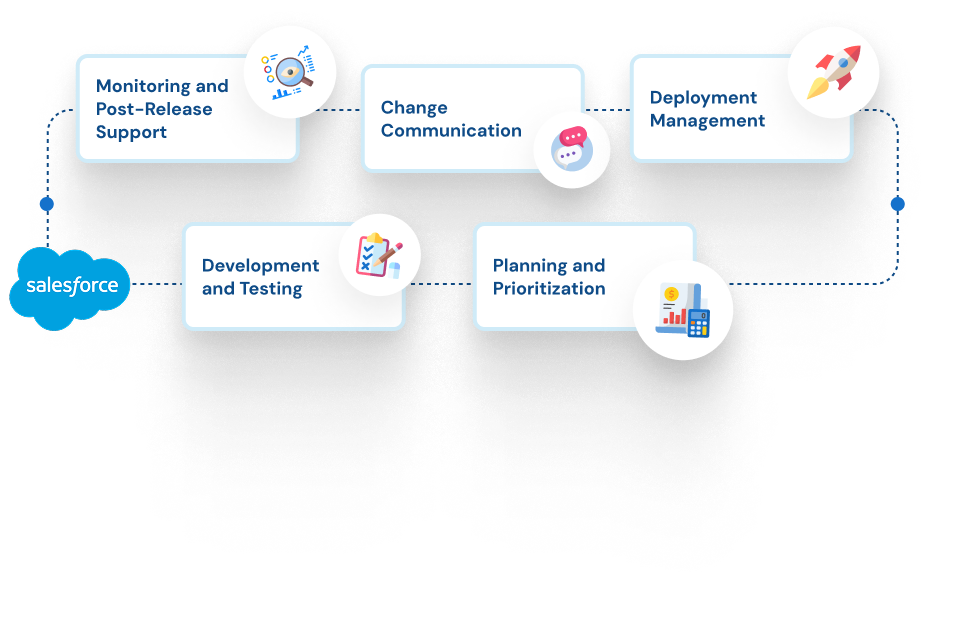
Plan, test, and deploy Salesforce changes through a structured release management process. Our team can help you coordinate releases, validate changes, manage deployment dependencies, and support post-release monitoring across Salesforce environments.
Manage Salesforce Releases with Greater Control
Salesforce releases involve more than moving changes from one environment to another. Teams need to check dependencies, test customizations, coordinate deployments, and make sure important business processes continue to work as expected.
Cloud Analogy can help you organize these activities through a structured release management process. From planning and testing to deployment and post-release checks, we work with your team to identify potential issues early and make Salesforce changes with greater confidence.
Planning Your Next Salesforce Release?
Prepare your changes, validate critical workflows, and coordinate deployment activities with a clear release plan.
Common Salesforce Release Management Challenges
Limited Release Visibility
Teams can struggle to track changes, deployment progress, and dependencies across multiple Salesforce projects and environments. Without a clear view of release status, coordination becomes harder.
Gaps in Testing
Incomplete functional and regression testing can leave issues undiscovered until deployment. Testing critical workflows, integrations, and customizations helps teams catch problems earlier.
Unclear Impact of Changes
A change to an Apex class, Flow, validation rule, or shared component can affect other parts of a Salesforce org. Identifying dependencies before deployment helps teams plan the right tests.
Complex Third-Party Integrations
Salesforce changes can affect connected applications, APIs, and data flows. Teams need to validate integration dependencies and confirm that important exchanges continue to work after deployment.
Deployment and Recovery Risks
Unplanned changes, configuration differences, or failed validation can disrupt a release. Clear approvals, deployment checks, and a documented recovery plan help teams respond when something goes wrong.
Salesforce Release Management Best Practices

A well-planned Salesforce release process helps teams introduce changes without losing sight of existing business requirements. From managing environments and reviewing code to testing changes before deployment, these practices help teams identify issues earlier and keep releases organized.
Plan Releases Across Salesforce Environments
Use Continuous Integration (CI)
Use Version Control and Feature Branches
Review Code Before Deployment
Build Security into the Release Process
Test Changes Before Production
Maintain a Practical Sandbox Strategy
Our Salesforce Release Management Process

Step 1:
Customize
Develop and configure Salesforce changes in the appropriate environment, using version control where applicable.

Step 2:
Compare
Compare source and target environments, check dependencies, and identify the components to deploy.

Step 3:
Review
Review the proposed changes, validate dependencies, and complete the required testing and approvals before deployment.

Step 4:
Deploy
Deploy approved changes to the target Salesforce environment using the appropriate deployment method and release checklist.

Step 5:
Track
Monitor deployment results, validate critical business workflows, and document release outcomes, errors, and follow-up actions.

Step 6:
Recover
If a release causes problems, follow a documented recovery plan to restore service and correct affected changes.
Want to experience seamless integration & unparalleled efficiency?
Benefits Of Hiring Cloud Analogy For
Salesforce Release Management Services

Our Results Tell The Story
Cloud Analogy has made a significant impact on our business success. Cloud Analogy helped our company to transform for good and supported us in implementing, customizing, and upgrading the organization's reputation. The work delivered was fantastic, the way I structured and wanted it to be, and it was according to my expectations. They managed the job well, and I am impressed with how Cloud Analogy and the team got the project done on the given deadlines.
Jonathan Matal Renovo Financial

Planning Your Next Salesforce Release?
Whether you’re improving an existing deployment process or preparing for upcoming Salesforce changes, let’s discuss your release workflow, testing needs and deployment challenges.
Frequently Asked Questions
Salesforce release management is the process of planning, testing, and deploying changes to a Salesforce environment in a controlled way. It covers configuration updates, custom code, integrations, testing, approvals, and post-deployment checks. A well-defined process helps teams coordinate changes, track dependencies, and reduce avoidable production issues.
The Salesforce release management process typically starts with planning and prioritizing changes. Teams then develop and validate updates in appropriate environments, review dependencies, test the release, and deploy approved changes to production. After deployment, they verify critical functionality, monitor for issues, and document the outcome. The exact workflow depends on the organization's Salesforce setup and release requirements.
Salesforce delivers three major seasonal platform releases each year: Spring, Summer, and Winter. Their rollout generally occurs around February, June, and October, although exact dates depend on the release calendar and instance. Salesforce also provides maintenance updates, and some products have more frequent release schedules. Teams should check official release notes and maintenance dates rather than rely on a fixed calendar alone.
Start by reviewing the official release notes and identifying features or changes that could affect your configuration, Apex code, Flows, integrations, and managed packages. Use a suitable sandbox preview environment to test important business processes, integrations, and regression scenarios before production is upgraded. Document any issues, validate fixes through your normal deployment path, and confirm critical functionality after the release. Salesforce recommends using preview sandboxes for early validation and keeping production-bound deployments on an appropriate non-preview path.
Effective Salesforce release management starts with clear release ownership, version control, and a defined deployment process. Test changes in non-production environments, validate dependencies, automate repeatable checks where practical, and require appropriate reviews and approvals before production deployment. Schedule releases carefully, maintain a recovery plan, and verify business-critical functionality afterward. These practices make releases easier to track and help teams identify problems before they affect users.
The right Salesforce release management tools depend on your team's workflow and technical needs. Salesforce-native options include Salesforce CLI, change sets, and DevOps Center, while teams may also use Git-based version control and CI/CD platforms to manage changes and automate testing and deployments. Third-party Salesforce DevOps tools can provide additional comparison, pipeline, and governance capabilities. Choose tools based on your environment, release complexity, integrations, and existing development practices.
Continuous integration and continuous delivery or deployment (CI/CD) help teams make Salesforce releases more repeatable by automating parts of the build, validation, testing, and deployment workflow. With source control and appropriate quality checks, teams can detect conflicts or failures earlier and reduce reliance on manual deployment steps. CI/CD still requires suitable test coverage, environment management, access controls, and human review where needed; automation alone does not guarantee a successful release.
A failed Salesforce deployment can result from missing dependencies, validation errors, test failures, permissions, or differences between environments. The team should review the deployment errors, identify the cause, correct the issue in the appropriate development environment, and rerun validation and testing before attempting deployment again. If a failed release has already affected production, follow the documented incident and recovery plan. Do not assume every Salesforce deployment can be rolled back automatically; recovery options depend on the change and deployment method.
Yes. Salesforce release management services can help teams review upcoming platform changes, plan regression testing, validate integrations and customizations, coordinate deployments, and investigate release-related issues. This can be useful when internal teams have limited capacity or need additional release-process expertise. The scope should be agreed in advance and tailored to the organization's Salesforce environments, critical workflows, and support requirements.
Look for a provider that understands Salesforce deployments, sandbox strategy, source control, testing, integrations, and release governance. Ask how they assess your current process, manage dependencies, document changes, handle failed deployments, and report release readiness. Relevant case studies, a clear delivery approach, defined responsibilities, and transparent communication are more useful than broad promises of error-free releases. Choose a provider whose experience and proposed process match your organization's technical complexity and support needs.


Cloud Analogy exceeded my high expectations. Their seamless and user-friendly approach to implementing Zoho CRM impressed me. They were transparent, accommodating, and patient throughout the process, making numerous changes without hassle. They explained everything clearly, ensuring we were on the same page. In the end, they delivered the desired solution. Working with Cloud Analogy was straightforward and satisfying. I highly recommend their professional and customer-centric services. Thank you, Cloud Analogy, for your outstanding support!.
Deepika Ramnath Solar Link Australia